Microservices to Transact Integration
For accounts listing dashboard, balances, and transactions microservices are the default connections. Now, transact supports all these features.
For transact connectivity, perform the following steps:
Operation or API Endpoints- Microservices vs Transact
The following are the Fabric operations, MS endpoints and IRIS API endpoints for Holdings and Arrangements microservices.
| Fabric Operation | MS Endpoint | IRIS API Endpoint |
|---|---|---|
| AMS | ||
| getAccountDetails | /api/v2.0.0/holdings/bulkarrangements/$accountID?altname=ACCOUNT | /v1.0.0/holdings?holdingsId=$Account_id
|
| getArrangements | /api/v2.0.0/holdings/parties/$customerId/bulkarrangements?productline=ACCOUNTS,LENDING,DEPOSITS,Portfolio | v2.0.0/holdings/customers/<Customer Ids List>/holdings
|
| getArrangementsByCustomerId | /api/v2.0.0/holdings/parties/$customerId/bulkarrangements?productline=ACCOUNTS,LENDING,DEPOSITS
|
v2.0.0/holdings/customers/<Customer Ids List>/holdings |
| HMS | ||
| getAccountBalances
|
/api/v3.0.0/holdings/accounts/$accountId/balances?roleId=ADMIN
|
/v2.0.0/holdings/customers/$coreCustomerIdList/holdings
|
| getAccountPostedTransactions
|
/api/v3.0.0/holdings/accounts/$accountId/transactions?roleId=ADMIN
|
v2.0.0/holdings/transactions?listType=PENDING&transactionCode=$transactionType&accountId=$accountID&dateFrom=$searchStartDate&page_size=$limit&page_start=$page_start&dateTo=$searchEndDate&minimumAmount=$searchMinAmount&maximumAmount=$searchMaxAmount
|
| searchTransactions
|
/api/v3.0.0/holdings/accounts/$accountId/transactions?transactionType=$transactionType&minAmount=$searchMinAmount&maxAmount=$searchMaxAmount&pageNumber=$offset&pageSize=$limit&fromDate=$searchStartDate&toDate=$searchEndDate&description=$searchDescription&roleId=ADMIN&transactionId=$transactionId | v2.0.0/holdings/transactions?listType=PENDING&transactionCode=$transactionType&accountId=$accountID&dateFrom=$searchStartDate&page_size=$limit&page_start=$page_start&dateTo=$searchEndDate&minimumAmount=$searchMinAmount&maximumAmount=$searchMaxAmount
|
Prerequisites
To support the transact environment instead of microservices, perform the following configurations in the fabric:
- Sign-in to your Fabric console.
- From the left pane, select Environments.
- For your Fabric run-time environment, click App Services.
- Navigate to Settings > Configurable Parameters.
- On the Server Properties tab, go to INTEGRATION_NAME Field Name and set the Field Value to T24 support.
- Switch the ARRANGEMENTS_BACKEND to T24 support.

- Re-publish the Authentication, ExternalUserManagement, and Arrangements fabric application.
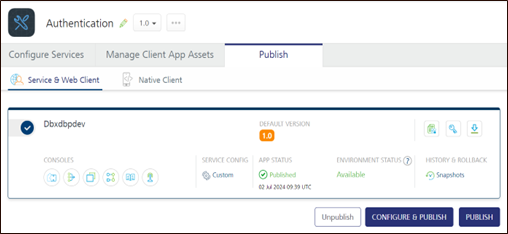
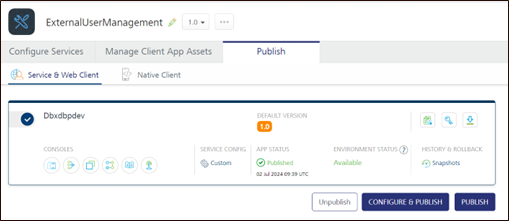
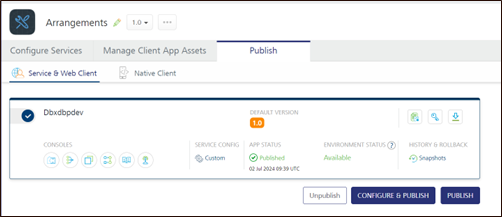

Operations
 getAccountPostedTransaction
Experience API: Holdings/operations/TransactionsList/getRecent
Class path: com/temenos/infinity/api/holdings/javaservice/GetAccountPendingAndPostedTransactionsOperation.java
Introduce an IF condition below invoke function
String ARRANGEMENTS_BACKEND = ServerConfigurations.ARRANGEMENTS_BACKEND.getValueIfExists();
if (ARRANGEMENTS_BACKEND!= null) {
               if (ARRANGEMENTS_BACKEND.equals("t24")) {
                    try {
                       HashMap<String, Object> headerParams = new HashMap<String, Object>();
                       HashMap<String, Object> inputParams = new HashMap<String, Object>();
                       inputParams.put("accountID",accountID );
                       inputParams.put("transactionType", transactionType);
                       inputParams.put("offset",offset );
                       inputParams.put("searchStartDate", searchStartDate);
                       inputParams.put("order", order);
                       inputParams.put("limit", limit);
                       inputParams.put("sortBy",sortBy );
                     String transactions = DBPServiceExecutorBuilder.builder()
                                .withServiceId("T24ISExtra")
                                .withOperationId("getAccountTransaction")
                                .withRequestParameters(inputParams).withRequestHeaders(headerParams)
                                .withDataControllerRequest(request).build().getResponse();
                     JSONObject transJson = new JSONObject(transactions);
                     JSONArray transactionsArr = (JSONArray) transJson.get("Transactions");
                     JSONObject transactionsRes = new JSONObject();
                     transactionsRes.put("accountransactionview",transactionsArr);
                     return JSONToResult.convert(transactionsRes.toString());
//                     GetAccountTransactionByType getAccountTransactionByType = new GetAccountTransactionByType();
//                     return getAccountTransactionByType.invoke(methodID, inputArray, request, response);
                    } catch (Exception e) {
                        e.printStackTrace();
                        throw new ApplicationException(ErrorCodeEnum.ERR_20041);
                    }
                }
               }
Refer to the following sample class file examples to create the services:
Create the service ArrangementsT24ISTransactions, operation getCompletedTransactions, getPendingTransaction, and getScheduledTransactions and add the pre and post processors.
For getCompletedTransactions :
Pre-processor:com.infinity.dbx.temenos.transactions.AccountlevelTransactionsPreProcessor
Post-processor:com.infinity.dbx.temenos.transactions.CompletedTransactionsPostProcessor
For getPendingTransactions :
Pre-processor:com.infinity.dbx.temenos.transactions.AccountlevelTransactionsPreProcessor
Post-processor:com.infinity.dbx.temenos.transactions.PendingTransactionsPostProcessor
For getScheduledTransactions:
Pre-processor:com.infinity.dbx.temenos.transactions.AccountlevelTransactionsPreProcessor
Post-processor:com.infinity.dbx.temenos.transactions.ScheduledTransactionsPostProcessor
For ArrangementsT24ISTransactions and the operation loanScheduleTransaction:
Pre-processor:com.infinity.dbx.temenos.transactions.LoanScheduleTransactionPreProcessor
Post-processor:com.infinity.dbx.temenos.transactions. LoanScheduleTransactionPostProcessor
searchTransactions
Experience API: DocumentManagement/operations/DownloadTransactions/generate
Class path: com/temenos/infinity/api/holdings/javaservice/GetSearchTransactionsOperation.java
Introduce an IF condition below of invoke function
String ARRANGEMENTS_BACKEND = ServerConfigurations.ARRANGEMENTS_BACKEND.getValueIfExists();
if (StringUtils.isNotBlank(ARRANGEMENTS_BACKEND)) {
if (ARRANGEMENTS_BACKEND.equals("t24")) {
    HashMap<String, Object> inputParams1 = new HashMap<String, Object>();
    for ( Map.Entry<String, String> entry : inputParams.entrySet()) {
        String key = entry.getKey();
        String value = entry.getValue();
        inputParams1.put(key, value);
    }

    String transactions = DBPServiceExecutorBuilder.builder()
                     .withServiceId("ArrangementsT24ISTransactions")
                     .withOperationId("searchTransactions")
                     .withRequestParameters(inputParams1).withRequestHeaders(request.getHeaderMap())
                     .withDataControllerRequest(request).build().getResponse();
    return JSONToResult.convert(transactions);
}
}
Refer to the following sample class file examples to create the services:
Create the service ArrangementsT24ISTransactions, the operation searchTransactions and add the pre and post processor.
Pre-processor:com.infinity.dbx.temenos.transactions.SearchTransactionsPreProcessor.
Post-processor:com.infinity.dbx.temenos.transactions.SearchTransactionsPostProcessor.
getAccountDetails
Experience API: Holdings/operations/ArrangementDetails/getDetails
Class path: com/temenos/infinity/api/arrangements/javaservice/GetAccountOverviewOperation.java
Introduce an IF condition below the Invoke function
String ARRANGEMENTS_BACKEND = ServerConfigurations.ARRANGEMENTS_BACKEND.getValueIfExists();
if (ARRANGEMENTS_BACKEND!= null) {
if (ARRANGEMENTS_BACKEND.equals("MOCK")) {
        Map<String, String> inputParams = HelperMethods.getInputParamMap(inputArray);
        inputParams.put("userId", customerID);
        inputArray[1] = inputParams;
       GetAccounts mockAccounts = new GetAccounts();
       return mockAccounts.invoke(methodID, inputArray, request, response);
    }
else if (ARRANGEMENTS_BACKEND.equals("t24")) {
        try {
           HashMap<String, Object> headerParams = new HashMap<String, Object>();
           HashMap<String, Object> inputParams = new HashMap<String, Object>();
           inputParams.put("accountID", request.getParameter("accountID"));
       String accounts = DBPServiceExecutorBuilder.builder()
                      .withServiceId("T24ISExtra")
                      .withOperationId("getAccountDetails")
                      .withRequestParameters(inputParams).withRequestHeaders(headerParams)
                      .withDataControllerRequest(request).build().getResponse();
       JSONObject accJson = new JSONObject(accounts);
       JSONObject accountsRes = new JSONObject();
       accountsRes.put("Accounts",accJson);
       return JSONToResult.convert(accountsRes.toString());
          } catch (Exception e) {
            e.printStackTrace();
              throw new ApplicationException(ErrorCodeEnum.ERR_20041);
          }
    }
}
Refer to the following sample class file to create the services:
getAccountBalances and getArrangements
Experience API: Holdings/operations/DigitalArrangements/getList
Class path: com/temenos/infinity/api/arrangements/javaservice/GetAccountsOperation.java
Introduce an IF condition below the Invoke function.
String ARRANGEMENTS_BACKEND = ServerConfigurations.ARRANGEMENTS_BACKEND.getValueIfExists();
if (ARRANGEMENTS_BACKEND!= null) {
      if (ARRANGEMENTS_BACKEND.equals("MOCK")) {
        Map<String, String> inputParams = HelperMethods.getInputParamMap(inputArray);
        inputParams.put("userId", customerID);
        inputArray[1] = inputParams;
       GetAccounts mockAccounts = new GetAccounts();
       return mockAccounts.invoke(methodID, inputArray, request, response);
    }
      else if (ARRANGEMENTS_BACKEND.equals("t24")) {
        try {
           HashMap<String, Object> headerParams = new HashMap<String, Object>();
           HashMap<String, Object> inputParams = new HashMap<String, Object>();
       String accounts = DBPServiceExecutorBuilder.builder()
                      .withServiceId("ArrangementT24ISAccounts")
                      .withOperationId("getAccountsByCoreCustomerIdList")
                      .withRequestParameters(inputParams).withRequestHeaders(headerParams)
                      .withDataControllerRequest(request).build().getResponse();
       return JSONToResult.convert(accounts);
          } catch (Exception e) {
            e.printStackTrace();
              throw new ApplicationException(ErrorCodeEnum.ERR_20041);
          }
    }
}
Refer to the following sample class file to create the services:
- GetAccountsOperation.java
- ArrangementT24ISAccounts
- getAccountsFromT24PreProcessor
- getAccountsFromT24Post Processor
Create the service ArrangementT24ISAccounts, the operation getAccountsByCoreCustomerIdList and add pre and post processor.
Pre-processor:com.infinity.dbx.temenos.accounts.getAccountsFromT24PreProcessor
Post-processor:com.infinity.dbx.temenos.accounts.getAccountsFromT24PostProcessor
getArrangementsByCustomerId
getArrangementsByCustomerId is not implemented in the base application, refer to the above services and implement the same approach for this API.
Set the required value in server configuration (T24 or MS).
In this topic